
CRM AUTOMATION · SYDNEY · AUSTRALIA AND NEW ZEALAND
We automate the work around HubSpot, Salesforce, Pipedrive and other CRMs: leads captured from forms, email and calls, records kept clean, first replies and follow-ups on time, and won deals handed to quoting and invoicing. AI does the typing and summarising; your team approves what goes out.
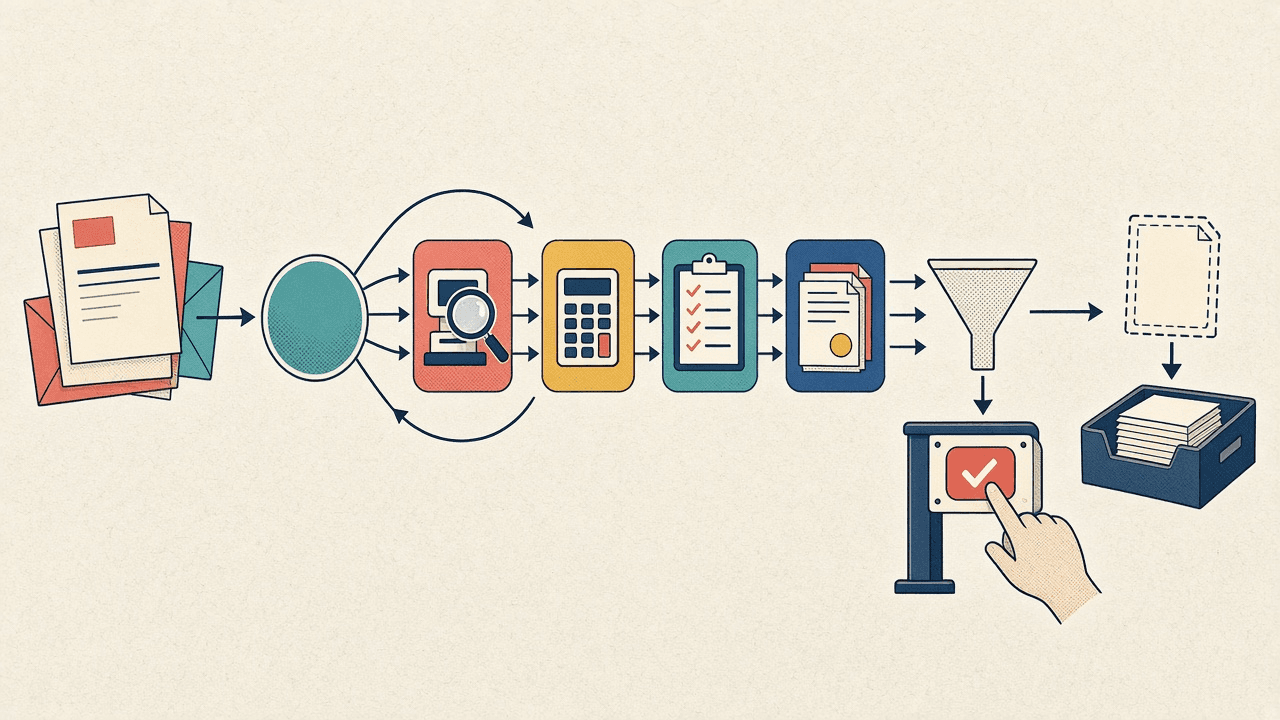
- CAPTUREForms, inbox and calls into the CRMone record, an owner, a source
- CLEANEnriched and de-duplicatedABN checked, fields standardised
- FIRST REPLYAcknowledged in minutesfollow-ups drafted for a person
- ROUTERight owner, right taskhot leads alert sales straight away
- HANDOVERWon deal to quote, job and invoicedrafts in Xero or MYOB
- SUMMARISECalls and emails noted on the recorda person checks before it sends
001 / THE SHORT ANSWER
CRM automation is software doing the admin around your CRM so salespeople can sell. Leads arrive in the CRM on their own, records stay clean, follow-ups happen on time and won deals move to quoting and invoicing without anyone retyping them.
Start with lead capture and the first reply. For most Australian small and medium businesses the biggest leak isn't a missing feature in the CRM; it's enquiries that never get into it, or wait hours for anyone to answer. Fix that, then automate quote follow-up, then reporting.
The usual order we work in:
- ✓Every enquiry from your website, inbox and phone lands in the CRM with an owner and a source
- ✓Each one gets a short acknowledgement within minutes, day or night
- ✓Follow-ups and tasks are created automatically, with a person approving what goes out
- ✓Won deals hand over to quoting, jobs and invoicing, and a weekly scoreboard shows what's working
002 / WHERE THE LINE SITS
Automate the admin; keep the relationship human. Anything that promises a price, commits to a date or speaks for you in a tricky moment goes past a person first.
GOOD TO AUTOMATE
- ✓Creating and updating contacts from forms, emails and calls
- ✓Merging duplicates and filling in missing company details
- ✓A short acknowledgement the moment an enquiry arrives
- ✓Follow-up tasks, reminders and stage changes
- ✓Summaries of calls and email threads on the record
- ✓Weekly pipeline numbers to Slack, Teams or email
KEEP A PERSON IN CHARGE OF
- ✓Quotes, prices, discounts and delivery dates
- ✓Replies to complaints, disputes or upset customers
- ✓Deciding a deal is lost and recording why
- ✓Who gets added to marketing, and on what consent
- ✓Merging records when the match is uncertain
003 / LEAD CAPTURE
A workflow watches every place enquiries arrive, reads them, and creates or updates one CRM record. This is the pattern behind our Salesforce lead intake for a financial services firm, where referrals arrive as long forwarded email chains.
- 01
Every source watched
Website forms post to a webhook; shared inboxes in Microsoft 365 or Gmail are monitored; calls and voice-agent transcripts arrive from your phone system.
- 02
Genuine or not
AI sorts real enquiries from spam, job applications, vendor pitches and everyday email, so the CRM only gets leads.
- 03
Details extracted
Name, company, phone, email, service and timing read from the message, attachments and even image signatures. In forwarded referrals, the real prospect is separated from the introducer.
- 04
Checked and matched
The contact is matched by email and phone, so a repeat enquiry updates the existing record instead of creating a duplicate.
- 05
A person approves
Where accuracy matters, a draft lead with confidence flags waits for one click. Nothing reaches Salesforce in that build until a person approves it.
004 / DATA QUALITY
Yes, with a person deciding the uncertain cases. Clear duplicates can be merged by email, phone and company; borderline matches go on a list for someone who knows the customers. Automating the merge without that review is how good history gets lost.
Enrichment for Australian businesses starts with the basics: checking the ABN and legal name against the Australian Business Register, standardising phone numbers and states, and tagging the lead source. An AI research step can add a short company brief for hot leads.
The lasting fix is upstream: required fields, picklists instead of free text, and one workflow writing to the CRM instead of five tools each doing it their own way.
005 / FOLLOW-UP
Send the acknowledgement automatically, and let AI draft the rest for a person to approve. A short, personal “thanks, here's what happens next” within minutes is safe to automate. Anything that quotes, promises or answers a hard question gets a human look.
Our free speed-to-lead n8n template shows the pattern: a form enquiry is checked by AI, scored against your ideal customer, upserted into HubSpot with a two-line summary, acknowledged by email with no prices or promises, and sent to sales in Slack if it's hot. The same workflow can use Pipedrive, Zoho CRM or Salesforce instead.
Follow-up sequences then run on rules you agree:
- ✓Each step drafted with the context from the enquiry, approved by the lead's owner
- ✓Stops the moment the person replies, books, or unsubscribes
- ✓Quotes get a follow-up scheduled the moment they're sent, so none sit in 'sent'
For the managed version, with instant replies, scoring and alerts set up for you, see lead generation automation.
006 / ROUTING, HYGIENE AND REPORTING
The smaller workflows that keep a pipeline honest.
Routing and tasks
Leads assigned by service, region or round-robin, with a call task due within the hour for hot ones and an escalation if nobody picks it up.
Pipeline hygiene
Deals with no next step, stale stages, missing close dates and quotes without follow-ups, listed for their owners every Friday.
Lost reasons
A required reason when a deal is closed lost, so you can see why business goes elsewhere.
Reporting
Leads, response time, quotes sent and win rate by source, sent to Slack, Teams or email each week.
007 / HANDOVER
A workflow carries the deal forward so nobody retypes it. When a deal reaches the right stage, the quote is drafted from the enquiry and your price list for a person to check and send. When it's won, the job is created, and when the job is done, a draft invoice appears in Xero or MYOB.
New customers can have their ABN checked before they become accounting contacts, and names matched carefully, because a company's CRM name often differs from its legal name in your accounts. More on the accounting side in Xero automation.
The whole path from enquiry to paid is our lead-to-cash automation service. If you'd rather start by finding where leads leak, the lead-to-cash conversion system maps your funnel and fixes the biggest leak first.
008 / AI FOR CRM
Yes, and it's one of the most useful AI features for a CRM. A call recording, voice-agent transcript or long email thread becomes a short note on the contact or deal, with next steps turned into tasks and the key fields updated.
For Smart Call Systems we built an after-hours voice agent for real estate agencies with 29 n8n automations behind it, keeping contacts, pipeline stages, appointments and call notes in sync with GoHighLevel and propagating opt-outs everywhere. If your phones are the gap, see our AI receptionist page, and if you run HighLevel, our GoHighLevel automation page covers that build in detail. Mortgage brokers use the same pattern to turn call notes into fact-find fields and file notes; see AI for mortgage brokers.
HubSpot, Salesforce and others ship their own AI assistants on some plans; use them where they cover the job. If you run HubSpot, our HubSpot automation page covers which workflows your edition includes, Breeze and the Xero sync. A custom step makes sense when the summary must follow your format, draw on other systems or keep personal details away from the model. If you run Salesforce and want help with the platform itself, including Agentforce agents, see our Salesforce consultant page.
009 / COMPARE
Use your CRM's own automation for anything that starts and ends inside the CRM, such as HubSpot workflows and sequences, Salesforce Flow or Pipedrive's automations. Reach for an automation tool when the work crosses into your inbox, phone system, accounts or an AI model, and for custom code only when a tool can't do the job cleanly.
We're a Zapier partner as well as n8n builders, so we'll say when Zapier or Make is the simpler answer. More on the trade-offs in n8n consultants and Zapier and Make to n8n migration.
| Criterion | Native CRM workflows | Zapier or Make | n8n workflow | Custom code |
|---|---|---|---|---|
| BEST FOR | Rules inside the CRM: assignment, stage changes, tasks, sequences | Simple links between two apps at low volume | Multi-step workflows across several systems, with AI, checks and approvals | Unusual data, heavy volume or a portal your customers use |
| SET-UP EFFORT | Lowest, if your plan includes it | Low to moderate | Moderate: designed and tested on your real leads | Highest: built, tested and maintained as software |
| REACHES OUTSIDE THE CRM | Through the CRM's own integrations | Thousands of app connectors | Any system with an API, plus code where needed | Anything, by design |
| WHERE DATA IS PROCESSED | In the CRM's hosting region | The vendor's cloud | Can be self-hosted in an Australian region | Wherever you deploy it |
| AI WITH GUARDRAILS | The CRM's own AI features, on some plans | Possible, harder to check and log | Validation, retries, approval steps and a full run history | Fully controlled, more to build |
| COST SHAPE | Part of your CRM subscription tier | Monthly plans priced by usage | A scoped build, plus hosting and optional support | A scoped build, plus hosting and maintenance |
010 / SPAM ACT AND PRIVACY ACT
In Australia, commercial emails and SMS fall under the Spam Act 2003: you generally need consent, must identify your business and must include a working unsubscribe that you honour. Marketing calls have separate rules, including the Do Not Call Register. Automation helps, because it applies the rules the same way every time. For marketing email and SMS at scale, our Dotdigital partner page covers consent tracking and unsubscribes in the platform itself.
The Privacy Act 1988 and the Australian Privacy Principles cover how you collect, use and secure personal information, including direct marketing and sending data overseas. Many small businesses with turnover under $3 million are exempt, with exceptions, so check where you stand. Our Privacy Act guide for AI in business covers more. This is general information, not legal advice.
CONTROLS WE BUILD IN
- ✓Consent captured on the form and stored on the contact, with the date and source
- ✓Replying to an enquiry kept separate from adding someone to marketing
- ✓Sequences stop on a reply, a booking or an unsubscribe, and opt-outs sync to every tool
- ✓Only the fields a step needs go to the AI model; sensitive details masked or left out
- ✓n8n self-hosted in AWS Sydney or your own environment when the data calls for it
011 / WHO YOU'D WORK WITH
We build CRM workflows that run in production, with a person in the loop. Our Salesforce lead intake workflow for a financial services firm runs on AWS Sydney, masks personal details before the language model sees them, and prepares review-ready draft leads with a 22-second median in timed runs. We publish our working too, including a tested n8n build with one human approval step.
Beyond the CRM. The same workflows connect to chatbots, voice agents and your accounts; see agentic workflows and AI agent development. Where data must stay onshore, we use AI models hosted in Australia.
How it runs. One workflow first, tested on your recent enquiries, then the next. Every build is scoped and priced in writing, and most first workflows are live in three to eight weeks. AI Lab Australia was founded in Sydney in 2023; we work remotely with businesses across Australia and New Zealand, and fly in for kick-offs, training and go-lives when being there in person helps.
012 / BUILT AND RUNNING


013 / QUESTIONS
Anything else is quicker to answer on a call. Thirty minutes, free, with the people who would build it.
CRM automation is software doing the repetitive work around your CRM: getting leads in from forms, email and calls, cleaning and de-duplicating records, sending the first reply, creating follow-up tasks, moving deals between stages, handing won deals to quoting and invoicing, and reporting. People still own the conversations and the decisions.
Tell us where leads come from and where they stall. In thirty minutes we'll sketch what to automate, what to leave with your team and where a person approves.
Book a free call→