AI agent workflows with one human approval: a tested n8n build for supplier bills in Xero

On this page · 11 sections
- 01The idea, in our words
- 02The worked example: supplier bills from email to a draft bill in Xero
- 03The loop: write the check first
- 04The gate: approve the last step, and make it reversible
- 05What we actually tested
- 06How to apply this to your own pipeline
- 07Security controls we built in
- 08What we'd tell you before you switch it on
- 09FAQ
- 10Want this built for your accounts team?
- 11Sources
Hanako's X Article, Loops and Graphs: how to stop babysitting agents and only approve the last step, went up on 23 August 2026 and had about 15.9 million impressions and 18,700 bookmarks when we checked on 18 November. It's one of the clearest explanations of agent design we've read, and it's all theory. So we built it in n8n, a fair-code workflow automation tool you can host yourself: a workflow that reads supplier invoices from email, checks them with code, retries when the checks fail, and asks one person one question before anything touches Xero. Then we tested it.
We're AI Lab Australia, a Sydney artificial intelligence (AI) agency. We work as forward-deployed engineers, which means we sit inside your business and build the automation where the work actually happens, secure by default. Our take: Hanako is right, and most businesses will nod along and keep checking every step by hand anyway, because nobody has shown them what the checks look like for their own work. This post does.
We checked every n8n and Xero claim against official documentation on 18 November 2026, and ran the build on n8n 2.48.4, the current release that day.
The idea, in our words
A loop makes one unit of work correct. Produce, check, correct, repeat until it passes. The check has to be something a program can fail while you're out of the room. "The output looks good" isn't a check, and neither is "the model says it's confident". Her sharpest point: the absence of an error is not evidence of correctness. A loop built on "nothing crashed" repeats a mistake until the budget runs out, with a clean log the whole way.
A graph decides which units exist and how they connect. Nodes are bounded jobs; edges are dependencies. Her test for an edge is the bit we'd frame: if you can't name the variable that crosses from one step to the next, there is no edge, and the wait is waste. Most "and then" steps are just the order someone typed them in.
She names four kinds of node: a splitter that cuts up the work, workers that each do one unit in isolated context, code nodes for anything with one correct answer, and gates. The loop lives inside a node; the graph lives between them. The human belongs on one step, the one with the highest consequence and lowest reversibility, not scattered through the middle as the slowest node in the system.
She also sells a paid course on this at agent-layers.vercel.app. We haven't taken it, so we can't review it.
The worked example: supplier bills from email to a draft bill in Xero
We picked accounts payable because invoices arrive as PDF (portable document format) files, someone retypes them, someone else checks the maths and the ABN (Australian Business Number), and duplicates still slip through. A confident wrong answer here costs real money.
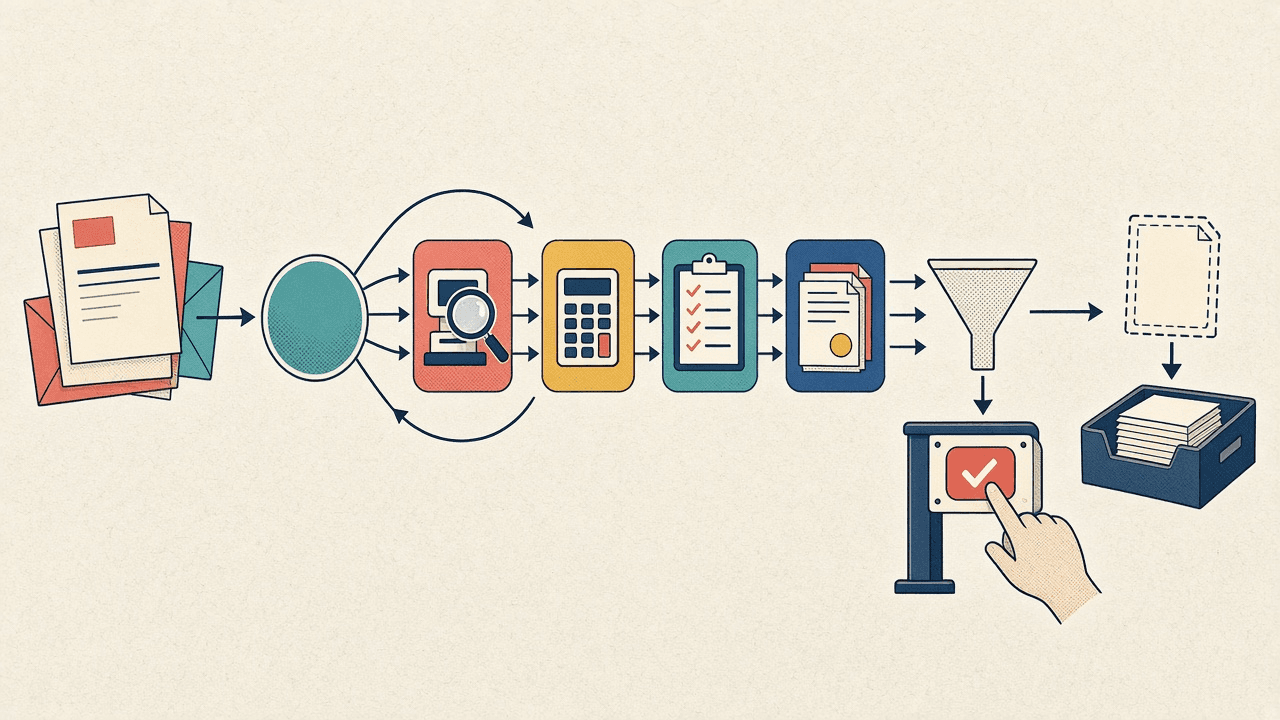
The workflow, start to finish:
- Trigger and text. n8n's Gmail Trigger picks up one unread email with a PDF from a "bills" label per poll, and the Extract From File node turns the PDF into text.
- The worker, inside a loop. An Information Extractor node (n8n's built-in node that turns text into fields against a JSON (JavaScript Object Notation) schema) pulls out supplier, ABN, invoice number, dates, purchase order (PO) number, line items, subtotal, goods and services tax (GST) and total. It sees the invoice text and nothing else.
- The check. A Code node tests the extraction. If it fails, another Code node writes a correction note and sends the unit back. Three attempts, then it stops.
- Four lookups in parallel. The ABR (Australian Business Register) ABN Lookup service, a supplier search in Xero, a PO lookup in Xero, and a duplicate bill search in Xero.
- Merge and validate. The Merge node waits for all four, then a Code node joins the results and lists anything that blocks the bill.
- One gate. If nothing blocks it, Gmail's send and wait operation emails the approver a summary with two buttons: Create draft bill, or Reject.
- A single write. On approval, one HTTP Request node (n8n's general tool for calling a web service) creates the bill in Xero with its status forced to DRAFT. Anything that fails, stalls or gets rejected gets a Gmail label for a person instead.
Why four lookups and not a chain
Run Hanako's arrow test on step 4. The ABR lookup and the supplier search need the ABN. The PO lookup needs the PO number. The duplicate search needs the invoice number. All four read the worker's output and none reads another's, so there are no edges between them and they run side by side. As a chain, three of those waits would be pure waste.
The join happens later, in code: the merge keeps only duplicate bills belonging to the supplier the contact search found. One correct answer, so no model goes near it.
The four node kinds, mapped
- Splitter: the trigger, taking one invoice per run so a bad one can't stall a good one.
- Worker: one model call in isolated context. It never sees the email body, the signature or another supplier's invoice.
- Code nodes: the check, the correction note, the merge and the bill payload. Hanako's test: if you can describe a step without the words judge, decide, assess or summarise, it's code.
- Gate: the approval email, at the point where data first lands in your books.
The loop: write the check first
We wrote the check before the prompt. It fails the extraction on a missing field, a bad ABN, an ABN or invoice number that isn't in the invoice text, line items that don't add up, GST that isn't 10% of the taxable lines, a wrong total, or a tax invoice of $1,000 or more with no buyer shown.
Two of those rules come from official sources. The ABR publishes the ABN check method: subtract 1 from the first digit, multiply each digit by a fixed weight, add them up, and the total must divide evenly by 89. The ATO (Australian Taxation Office) confirms GST is a 10% tax on most goods and services, and its tax invoice rules require the seller's ABN on every tax invoice and the buyer's identity or ABN from $1,000. The ATO also lets suppliers round GST line by line, so our check allows a cent of difference per taxable line rather than demanding an exact match.
Here's the core of the check, trimmed. The full version also tests dates, line maths and missing fields.
// Loop check: every line can fail, and no model is involved.
function digitsOnly(s) {
  return String(s || '').split('').filter(function (ch) { return ch >= '0' && ch <= '9'; }).join('');
}
function cents(n) { return Math.round(Number(n) * 100); }
function abnValid(abn) {
  // ABR method: subtract 1 from the first digit, apply the weights, sum, divide by 89
  var d = digitsOnly(abn);
  if (d.length !== 11) return false;
  var w = [10, 1, 3, 5, 7, 9, 11, 13, 15, 17, 19];
  var sum = 0;
  for (var i = 0; i < 11; i++) sum += (Number(d[i]) - (i === 0 ? 1 : 0)) * w[i];
  return sum % 89 === 0;
}
var failures = [];
if (!abnValid(x.abn)) failures.push('abn: fails the ABR checksum');
if (digitsOnly(text).indexOf(digitsOnly(x.abn)) === -1) failures.push('abn: not printed on the invoice');
var sumLines = 0, taxable = 0, taxableLines = 0;
x.lines.forEach(function (l) {
  sumLines += cents(l.lineAmount);
  if (l.gstApplies) { taxable += cents(l.lineAmount); taxableLines += 1; }
});
if (Math.abs(sumLines - cents(x.subtotal)) > 1) failures.push('subtotal: lines do not add up');
var expectedGst = Math.round(taxable / 10);
if (Math.abs(cents(x.gst) - expectedGst) > Math.max(1, taxableLines)) failures.push('gst: not 10% of the taxable lines');
if (Math.abs(cents(x.subtotal) + cents(x.gst) - cents(x.total)) > 1) failures.push('total: subtotal plus GST does not match');
if (cents(x.total) >= 100000 && !x.buyer) failures.push('buyer: needed on a tax invoice of $1,000 or more');
The line that matters most is the second one: the ABN has to be printed on the invoice. Without it, the retry loop creates a new risk. Tell a model "this ABN fails the checksum" and it may helpfully change a digit until it passes, giving you a valid-looking ABN that isn't on the invoice. This check catches that, and the prompt says to copy values, never correct them.
Return the unit, with a scope line
The correction note borrows Hanako's format: unit, verdict, reason, evidence and a scope line. Ours reads like "gst: is not 10% of the taxable lines, expected 152.00, got 137", then tells the model to re-read only the named fields and copy everything else unchanged.
After three failures the loop stops and labels the email for a person. If an invoice fails three times, the problem is usually the invoice, and no amount of retrying fixes a supplier's typo.
The gate: approve the last step, and make it reversible
Hanako's advice is to open gates on blast radius, not confidence, and to never open the lane that moves money. We took that literally:
- The money lane doesn't exist. The workflow holds no permission to approve or pay a bill.
- The one write is a draft. The bill lands in Xero as DRAFT, and your bookkeeper approves it in Xero as they do today. A wrong draft is easy to delete.
- The approver sees evidence, not a confidence score: the ABR's name for the supplier, ABN and GST status, the PO match, the GST arithmetic and how many attempts extraction took.
In n8n 2.48.4 the Gmail operation is called Send and Wait for Response, with the response type set to Approval; the documentation calls it send a message and wait for approval. We set a three-day limit. If nobody clicks, the run resumes as not approved, so a forgotten approval never becomes a yes.
What we actually tested
We used made-up invoices from fictional suppliers. Their ABNs pass the checksum but return "no record found" on ABN Lookup.
- Import. We imported the workflow into n8n 2.48.4 through its command line, and a script confirmed every node type, version, parameter name and connection exists in that release.
- Five runs inside n8n. In test copies, the model, ABN Lookup, Xero and Gmail nodes returned fixed sample responses, while every Code, If and Merge node stayed real:
- A clean invoice went straight through the check, the four lookups and the gate, and produced a DRAFT bill payload of type ACCPAY (Xero's code for a bill).
- An invoice with a GST-free permit fee, where the first extraction missed the GST-free flag, failed the GST check, went back once with the correction note, passed on attempt two and reached the gate.
- An invoice with a mistyped ABN failed the checksum on all three attempts, stopped at the cap and was labelled for a person. Nothing reached Xero.
- A duplicate of an existing bill passed extraction and was blocked at the merge.
- A clean invoice the approver rejected was labelled, and nothing was created.
- The code on its own. Run as plain JavaScript, the check passed the ABR's worked example ABN and caught a model "fixing" a bad ABN into one that isn't on the invoice. The merge blocked a PO total mismatch, GST charged without GST registration, and an ABN Lookup error.
We didn't test live Gmail, Xero, ABR or model connections. Extraction quality depends on your invoices and model, which is why the check exists.
How to apply this to your own pipeline
Take one process you run every week and do three things.
- Name the variable on every arrow. Write your steps down and, for each arrow, write what actually crosses it: an ABN, a file, a customer ID. If you can't name one, delete the arrow and run those steps side by side.
- Find the code nodes. Circle every step with one correct answer: totals, dates, matching, de-duplicating, formatting. Take the model out of all of them. You'll be left with very few genuine judgement steps.
- Write the check first. For each remaining model step, write the conditions a program could fail before you write the prompt. If you can't think of any, that step isn't ready to run without you.
Then put one gate in front of the first irreversible thing, and nowhere else.
Security controls we built in
- Least-privilege Xero access. Xero has no draft-only scope, so the draft rule lives in the workflow: the create node forces DRAFT after everything else. For access, create your own Xero app and request only offline_access, accounting.invoices and accounting.contacts.read. Since 2 March 2026, new Xero apps use granular scopes, and accounting.invoices covers invoices, bills and purchase orders without payments or bank access. We wire this up through n8n's generic OAuth2 credential (OAuth2 is the sign-in standard Xero uses for connected apps), because n8n's built-in Xero credential also requests payments, bank transactions and manual journals, which this job never needs.
- No new contacts from email. If the supplier isn't already in Xero, the bill is blocked. A stranger's invoice shouldn't create a payee.
- Caps on attempts and spend. Three extraction attempts, 12,000 characters of invoice text and a 2,000-token reply limit per attempt. The worst case is three model calls per invoice.
- Logging. Execution data is kept for successful and failed runs, every outcome ends in a Gmail label, and the approval email is a record. Set n8n's retention to suit your record-keeping policy.
- Only what the model needs. The model sees the invoice text alone, and is told to treat it as data, not instructions. Sole traders' invoices can contain personal information, so use a business account with your model provider and read our Privacy Act and AI guide on overseas disclosure.
- Placeholders only. The JSON contains no credentials, IDs or keys. You add your own after import.
What we'd tell you before you switch it on
It handles one PDF per email and codes every line to one default expense account, so your bookkeeper still checks coding and GST-free lines in the draft. It also leaves out Hanako's "learning edge", where accepted results feed back as new rules; add that once you can see which suppliers cause which failures. For the receivables side, see our n8n Xero pack. If you're still choosing your team's everyday AI tools, start with how to use Claude for business.
FAQ
What does "human in the loop" mean for an AI agent?
A person approves before the workflow does something that matters. The aim is one consequential approval, not a check at every step.
Can n8n pause a workflow until someone approves?
Yes. Gmail, Outlook, Slack, Microsoft Teams, Telegram and several other n8n nodes have a send and wait operation that pauses the run until someone responds, with an optional time limit.
Will this create or pay bills in Xero without me?
No. It creates nothing until the approver clicks, it only ever creates drafts, and it holds no permission to approve or pay.
Why use code for the checks instead of asking another AI to review?
Because, as Hanako puts it, a second model reviewing the first is two optimists agreeing. GST maths and the ABN checksum have one right answer, and code gets it every time, for free, with a clear reason when it fails.
How do I get the workflow JSON?
Contact us and we'll send it over. It imports into n8n and contains placeholders only.
Want this built for your accounts team?
We build approval-gated automations for Australian businesses, with the checks written first and the permissions kept narrow. See our business automation and AI consulting work, or get in touch.
Sources
- Hanako (@hanakoxbt), Loops and Graphs: how to stop babysitting agents and only approve the last step (full course), X Article, 23 August 2026, viewed 18 November 2026.
- n8n Docs, Gmail message operations, Merge, Information Extractor and Xero, checked 18 November 2026; node definitions checked in n8n 2.48.4.
- n8n source, Xero OAuth2 credential, checked 18 November 2026.
- Xero Developer, Granular scopes FAQs, Upcoming changes to Xero's accounting application programming interface (API) scopes and the Xero Accounting API OpenAPI specification, checked 18 November 2026.
- ABR, Format of the ABN and ABN Lookup JSON services, checked 18 November 2026.
- ATO, How GST works and Tax invoices, checked 18 November 2026.

WRITTEN BY
Roman Silantev
CEO and Lead AI Engineer. Scopes and builds AI systems for Australian businesses.
 ← PREVIOUSHow to use Claude for business in Australia: which features to switch on, and the settings to change first
 NEXT ARTICLE →AI Automation for Parramatta Businesses: What to Automate in Sydney's Second CBD